

In August 2014 Directr was acquired by Google, and they joined our team a few months later. Directr was an app that allowed businesses to create video ads easily, and it being a focus for YouTube at that time, YouTube was enthusiastic about adding their talents to our team.
This work was done for the internal team that used to be the Directr company, and similarly focuses on small business (SMB) video advertising.
This was a project the Directr team was interested in building, but they had no designer headcount for them. I volunteered to help them out and started to work on the design.
This project was presented to Susan Wojcicki (CEO of YouTube) to start a new business line, and its features eventually got released as a part of YouTube Director app.
Historical Context
Since ads revenue in many companies in tech has traditionally been very long-tail, the focus has for the most part been on the big spenders.
However, spending some time focusing on the smaller spenders not only makes it possible to improve the experience of a lot of people and gain brand equity, but also make the revenue more secure compared to the top N number of heavy spenders as a high number of low spenders is a more secure position in terms of revenue continuity than a low number of high spenders.
This makes it very useful for teams in the ads industry to focus on long-tail even if the direct revenue does not directly justify such an effort since it has numerous indirect returns in goodwill and revenue stability.
The problem(s)
SMBs had significant issues creating video ads, and seeing the returns from video advertising. This did not mean the returns did not exist, rather, the way Google communicated what they got for their money was mired in arcane (to SMBs) ad industry terms that were not obvious to a non-expert.
SMBs have significant issues figuring out what works well to maximize their ROAS (return on advertising spend). For example, when they create a video, it is possible to see on a per-second basis the retention of that video, and the rate of retention allows the video creator to understand exactly what makes people stop watching. This is extremely useful information, however, since this info was available in the depths of YouTube Analytics, the SMB of use for this very useful feature for ad creators was very nearly zero.
The ads metrics Google uses are alien to SMBs. For example, the primary metrics used in most online advertising is CPM (cost per mille, i.e. per 1000), CPA (Cost per acquisition), CPC (cost per click). However, to a physical store in San Francisco’s Market Street, none of these means anything, and what they want from Video Ads is in-person visits to their store. This is in fact countable, and when a Google Ads support representative sets this up for them, it works very well in increasing the spend and returns. However, we do not have the capacity to help SMBs one by one as their revenue per customer does not allow for this kind of attention.
Solutions
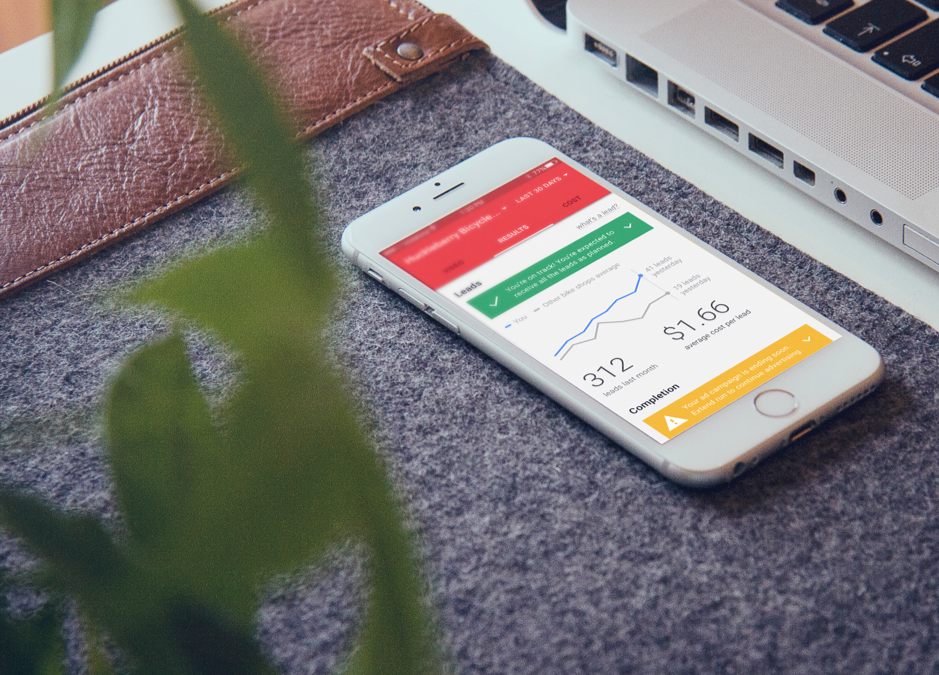
a) A mobile app that is entirely for small-business video ad creation and tracking of SMB video ads, returning metrics they understand.
At this point in time, Google’s mobile apps for Ads were either very complex (AdWords mobile), very simplistic on a separate stack where people get trapped on that stack after starting and cannot move away (AdWords Express). Moreover, neither of these products were focused on video, nor were they more meaningful than hieroglyphs to the small-business owners, the non-techy user base we were targeting as our long tail.
By positioning this product as targeting a very narrow niche, we were able to humanize the metrics that we use and render them meaningful to our users. For example, instead of using CPC or in-store visits metrics, we are calling them leads (image 1d), and depending on the campaign type it changes the underlying metric, which would be CPC/CPA for online campaigns, and in-store visits for in-store campaigns.
b) Make easy to understand predictions about whether the ad campaign is going to be able to accomplish its set goals, and offer recommendations to fix underperformance.
We also provide some predictions in both campaign creation and while the campaign is running. This allows removal of some ambiguity, in that the user can now tell us that they want 300 people a month coming into their store, and we can adjust the ad serving and the total cost to make that happen.
We also show the on-track or underperforming status while the campaign is running to ensure that the user can take corrective action (such as generating a new video) in a timely manner.
See Image 1d for on-track status, see Image 1b, 1c for a recommendation proposal to fix underperformance by regenerating the video to remove underperforming parts.
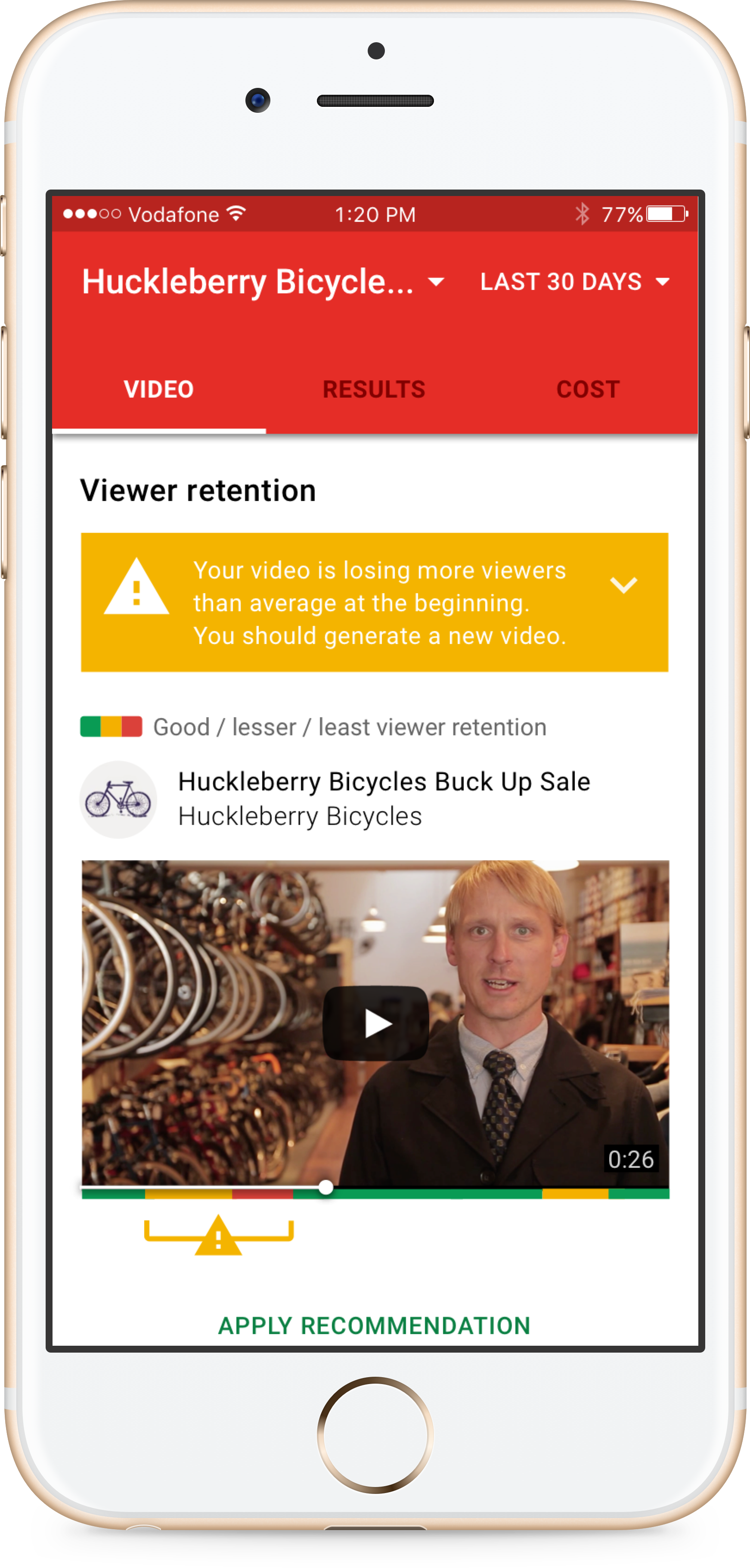
While we could propose edits to the video, since our system did not understand what is happening in the video as well as a human does, we required a human confirmation before applying the cuts to the video in question.
The continuation of this location is below.
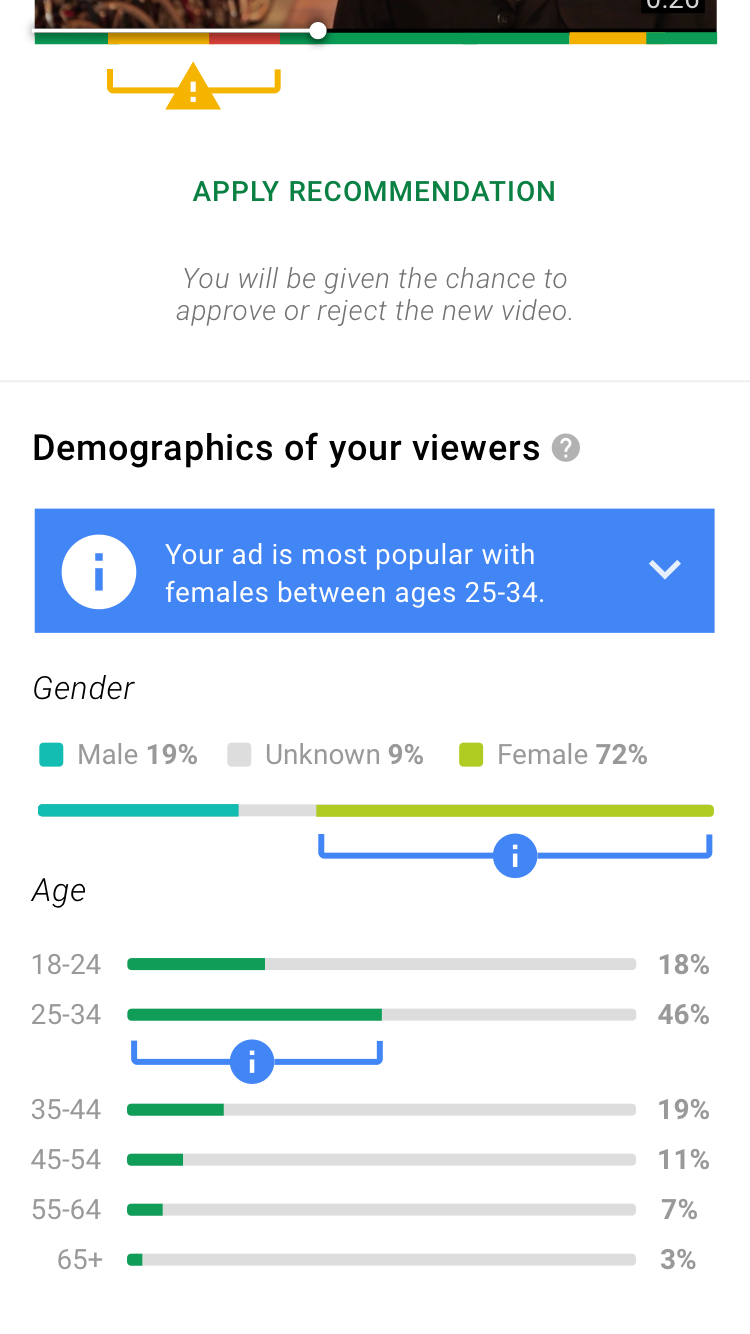
Insights with sources here and elsewhere in the app also double as training for eventual conversion to using the full-blown AdWords.
c) Ability to auto-track and highlight the best and worst-performing video sections, and best/worst performing demographics.
The demographic information for small business advertisers is very valuable because this is information about their online customers that they do not get any other way. A physical store owner usually has a good idea about who comes into the store and what type of people, however, it often turns out that other audiences are just as interested.
A very famous example of this is the My Little Pony animated series targeted originally at children but embraced their adult audience after discovering their interest.
Unlike highly-sophisticated online advertisers who are not new to these intersecting audiences, to SMB, non-expert users this is a big value-add. As a result, the design shows these demographic data in some detail, and we generate insight overlays when there are clear trends that the SMB user should know about.
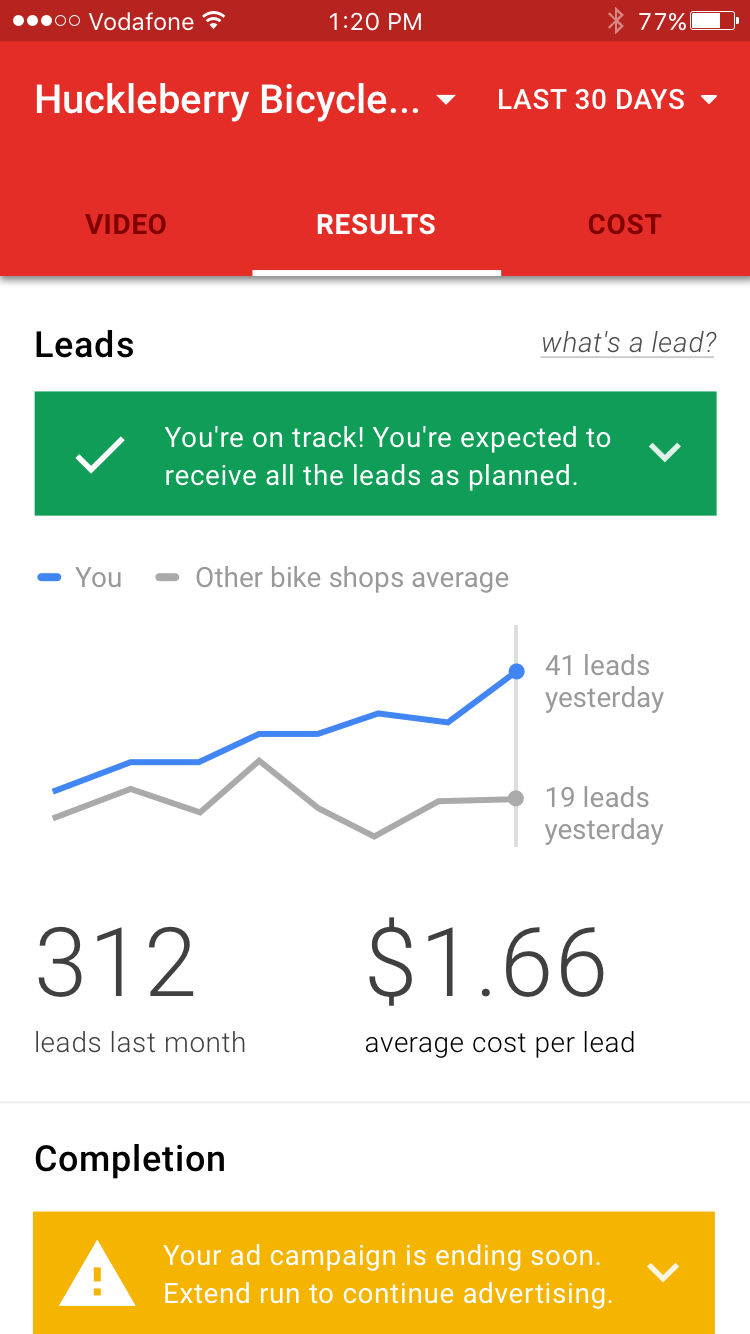
Under it, we have our confirmation that our campaign is on track. This is the one 'checkmark' that we teach the user to pursue, as this is the 'traffic light' indicator of everything going on within this ad spend.
At the very bottom, we have a warning that says the campaign is ending soon — and tapping this will confirm and then extend the campaign by one more month. This was informed by our SMB research that found campaigns lapsing while the intent is to continue is a common event with the audience we target.
d) Quick actions based on campaign status to allow for easy renewal and modification of campaigns.
One of the most common topics for support tickets coming from SMBs is them noticing their campaign having stopped running quite some time ago, without them noticing. This is very regrettable because it often is the case that the campaign is running well and earning them more revenue/profit than they spend on advertising, which is the ideal case.
However, since all advertising campaigns on AdWords has an end date, the campaign eventually terminates itself to not create a situation where someone forgets a running campaign and gets charged for a decade.
This is beneficial for customers, however, it does require some maintenance on the part of the user to keep a campaign going. AdWords does email the user when a campaign is ending, but this user segment of SMB business owners (who skew older) is often inundated with email to the point that they largely ignore their email inbox.
In this design, we handle these cases by considering these events as banner insights. Since this app is a day-to-day app for managing an SMB video ad campaign, this is the perfect place to raise these events, and ensure all campaign terminations are intentional.
Duration
Early 2016 → Late 2016
Role
- Primary designer
Design Work
- Product design
- Prototyping